

April 20, 2026
Secure File Sharing for Accountants: A Complete GuideProtect client data and meet PIPEDA compliance with our guide to secure file sharing for accountants. Learn about tools, policies, and best practices.
Read Full Post%20(1).webp)
Usman Malik
Chief Executive Officer
April 21, 2026

Most business owners don’t start by asking whether they need Business Standard or Business Premium. They start with a problem.
A clinic adds remote staff. A manufacturer hands tablets to supervisors on the floor. A finance team starts sharing more data in Teams and OneDrive. Suddenly, the old “we just need Office apps and email” mindset stops working. The question becomes simpler and more important: do you only need productivity tools, or do you need those tools wrapped in proper security and control?
That’s the core of the office 365 business and business premium decision. If you choose based only on sticker price, you’ll likely underbuy. If you choose based on a bloated feature checklist, you may overcomplicate the decision. The smart move is to look at business risk, compliance exposure, device sprawl, and what your team will need next.
Growth exposes weaknesses in your IT stack fast. What worked for a small team in one office often breaks down when people work from home, on the road, or across multiple sites. Files spread across devices. Access gets messy. Sensitive data starts moving through email, chat, and cloud storage without clear controls.
That’s where the office 365 business and business premium choice gets serious. For Canadian businesses in healthcare, legal, finance, construction, logistics, and manufacturing, this isn’t just a software purchase. It’s a decision about how much risk you’re willing to carry.

A modern workplace needs more than Word, Excel, Outlook, and Teams. It needs identity controls, device management, data protection, and a clean path to cloud growth. If your environment still treats security as a separate bolt-on, you’re creating management overhead and leaving gaps. That’s why many firms reviewing managed cloud computing strategies end up rethinking licensing at the same time.
Here’s the practical comparison early, because most articles bury it.
| Plan | Best fit | Price | Core value |
|---|---|---|---|
| Microsoft 365 Business Standard | Firms that mainly need productivity and collaboration | US$12.50/user/month | Office apps, Teams, cloud services |
| Microsoft 365 Business Premium | Firms that need productivity plus security, compliance, and device control | US$22/user/month with annual billing | Office apps plus Defender for Business, Intune, and Entra ID P1 |
Business Standard is the cheaper entry point. Business Premium is the stronger operating model.
If your team handles sensitive information, works from multiple devices, or has even modest compliance obligations, Business Premium is usually the right call.
A Canadian business with 25 staff can buy the cheaper licence today and still pay more over the next two years. That happens when one phishing incident, one unmanaged laptop, or one privacy review forces you to bolt on security tools and outside support after the fact.
That is the primary split between these plans. Business Standard is built to give staff the tools to work. Business Premium is built to reduce risk while the business grows.
Business Standard fits companies that mainly need email, Office apps, Teams, and file sharing. If your staff work on a small number of company-managed devices, handle low-sensitivity data, and face limited compliance pressure, Standard can be a sensible cost-control choice.
But call it what it is. It is a productivity subscription.
For firms comparing Office for Business 365 licensing options, the common buying mistake often occurs. They compare app access, ignore governance, and assume they can add protection later without much operational friction. In practice, that often means extra vendors, more admin time, and inconsistent controls across laptops, phones, identities, and data.
Business Premium starts from a different assumption. Staff work from home, on the road, and on personal phones. Password attacks are constant. Lost devices happen. Clients ask security questions before signing. Regulators and insurers expect documented controls, not verbal assurances.
Microsoft positions Business Premium for organizations with up to 300 users and includes Microsoft Defender for Business, Intune, Entra ID P1, Teams, Office apps, and OneDrive storage, as outlined on the Microsoft 365 Business Premium product page.
That matters because the licence changes your operating model, not just your app list. You can set device policies, enforce access rules, and build a cleaner path toward compliance work tied to PIPEDA, HIPAA, or cyber insurance questionnaires. For many Canadian SMBs, that lowers total cost of ownership more than the monthly price difference suggests.
The gap has widened because business risk has widened. Hybrid work, client security reviews, ransomware pressure, and rising insurance scrutiny all push SMBs toward tighter identity and device control. Premium answers that need without forcing a jump into enterprise licensing.
Price matters, but sticker price is the wrong first filter. If Microsoft proceeds with planned price changes to higher-tier plans in 2026, that will only sharpen the value case for SMBs that need stronger controls without stepping into E3 complexity, as discussed in this 2026 Business Premium vs Business Standard analysis.
Advisor’s view: Business Standard works for firms buying software. Business Premium works for firms buying lower risk, cleaner compliance posture, and fewer IT gaps to fix later.
For day-to-day work, the gap between the two plans is smaller than many buyers expect. That’s why so many business owners get stuck. On the surface, both options look similar.
If your team’s main concern is getting work done, either plan gives you a strong baseline. Both support the familiar Microsoft environment most staff already know how to use.
That similarity is why some businesses start on Standard and assume they’re covered. From a productivity angle, they often are.
The biggest licensing mistake I see is overvaluing app parity and undervaluing operational control. If both plans let your staff write proposals, run meetings, update spreadsheets, and share files, then productivity alone doesn’t settle the decision.
This is also why many businesses researching Office for Business 365 options feel confused by feature grids. Those grids show a lot of overlap, but they don’t tell you what happens when a device is lost, when a user logs in from an unmanaged laptop, or when sensitive information moves into the wrong place.
| Area | Business Standard | Business Premium |
|---|---|---|
| Office productivity apps | Yes | Yes |
| Teams collaboration | Yes | Yes |
| Cloud-based file work | Yes | Yes |
| Core business services | Yes | Yes |
| Advanced security stack | Limited | Yes |
| Device management maturity | Limited | Yes |
Business Standard wins only if your requirements are narrow. If your business is already juggling remote work, mobile devices, client data, or compliance reviews, the similar app experience is almost irrelevant. The difference that matters starts after the user signs in.
A staff member leaves a laptop in a taxi after checking email, downloading client files, and signing into Teams from a personal phone earlier that day. At that point, the licensing decision stops being about apps. It becomes a question of containment, liability, and how much operational control your business has.
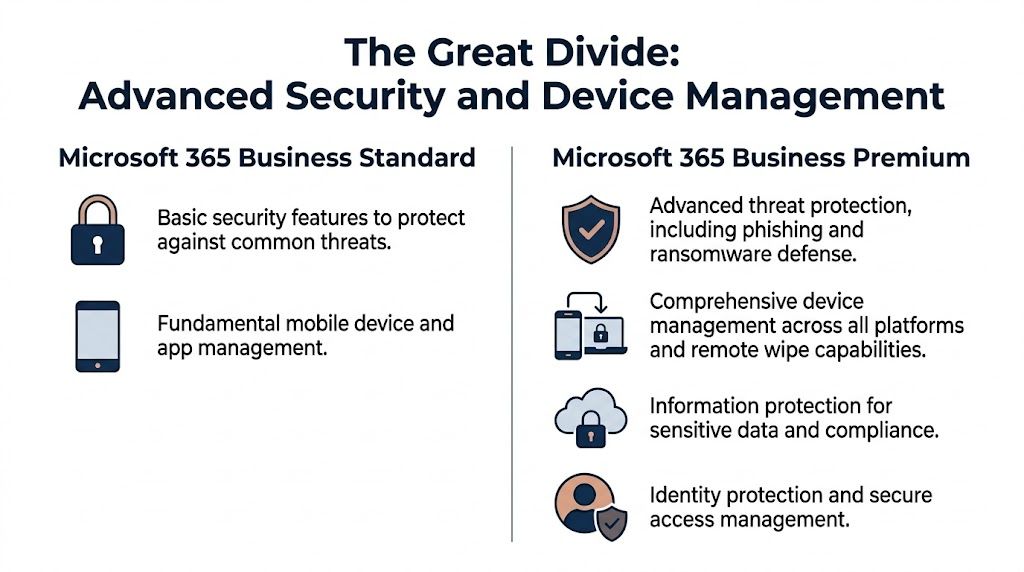
Business Premium changes the risk profile of a Canadian SMB. It bundles endpoint protection, device management, and stronger identity controls into the same environment your team already uses for email and collaboration. Standard does not. That gap matters most in businesses handling regulated data, remote staff, shared devices, or any mix of company-owned and personal hardware.
Basic email filtering is table stakes. It does not solve account takeover, suspicious sign-ins, ransomware on endpoints, or a compromised device that still has access to company data.
Business Premium adds Microsoft Defender for Business, which gives you stronger protection and response across user devices. That means faster isolation of a risky machine, better visibility into suspicious activity, and fewer blind spots between email, identity, and the endpoint itself. For a medical clinic, law office, or accounting firm, that is not a technical upgrade. It is a way to limit downtime and contain the cost of a security incident.
Business Standard can still be secured, but you usually get there by buying separate tools and accepting more admin overhead.
Many SMBs underestimate device management until they need it. A remote employee uses a home PC. A supervisor checks files from a phone. A field tech signs into Microsoft 365 on a tablet that no one in IT has ever seen.
Intune gives you policy control over those scenarios. You can require encryption, enforce screen lock rules, control app access, and wipe business data from a lost or retired device. You can also set a minimum security standard before a device reaches company resources. That is a practical control for PIPEDA-minded organizations and for healthcare businesses with HIPAA-related workflow requirements, because it reduces the chance that sensitive data sits on an unmanaged endpoint without oversight.
If your business cannot answer these three questions clearly, Standard is usually too light:
The old model was simple and weak. Give users a password, add MFA if possible, and hope nothing unusual happens.
Business Premium improves that model with Entra ID P1. You can apply conditional access policies, restrict sign-ins based on risk or device status, and enforce tighter rules for admins or staff working with sensitive records. That matters because identity failures often turn into larger business failures. One compromised account can expose SharePoint files, email history, Teams conversations, and line-of-business integrations in a single step.
If you want a clearer framework for sign-ins, access policy, and permission hygiene, this guide to effective cloud identity management is useful context.
Canadian businesses often miss this point. Compliance costs are not limited to audits, policies, or legal review. They show up in day-to-day operations when your team has to prove who had access, which devices were compliant, and whether sensitive information was protected consistently.
Business Premium makes that easier because the controls live inside the Microsoft 365 stack instead of being patched together from separate products. That is a better fit for firms subject to privacy obligations under PIPEDA, and for organizations handling healthcare, financial, or legal data where access control and device governance need to be more than informal practice.
A fragmented setup creates predictable problems:
More vendors to manage
You pay for extra security or MDM tools to fill the gaps in Standard.
More admin time
Your internal IT team or MSP has to configure and monitor separate systems.
More audit friction
Evidence is scattered across products, which makes reviews and incident response slower.
A stronger Microsoft 365 security strategy for Calgary businesses starts with fewer consoles, tighter policy enforcement, and better control over devices and identities.
Business Premium is the better choice for any SMB that has compliance exposure, hybrid work, mobile users, or growth plans that will make security harder next year than it is today. Standard fits only when your environment is simple, tightly controlled, and likely to stay that way.
Too many leaders compare these plans the wrong way. They look at the monthly user price and stop there.
That’s a purchasing view, not a business view.
Business Standard is cheaper. Nobody disputes that. If all you need is productivity software, lower cost wins.
But most medium-sized businesses don’t stop at productivity. They add endpoint protection, mobile device management, identity controls, retention policies, and outside support to make the environment safe enough to operate. Once you do that, Standard often stops being the cheaper option in practice.
Business Premium often lowers total cost of ownership because it consolidates functions that many businesses would otherwise buy and manage separately. It also reduces the chance that a weakly managed device or poorly controlled account turns into a much bigger business problem.
Use this lens instead of a narrow licence comparison:
If your business has low sensitivity data, limited mobility, and minimal compliance exposure, Standard can still be the right fit. There’s nothing wrong with staying lean when the risk profile supports it.
If you’re already adding security tools around Standard, stop pretending it’s the cheaper plan. It’s often the cheaper licence and the more expensive operating model. Businesses reviewing Microsoft 365 licensing options should look at the full environment, not just one line on an invoice.
Practical rule: Buy the plan that matches the environment you actually run, not the one you wish you still had.
A five-person clinic in Ontario, a 20-user construction firm in Alberta, and a 12-seat accounting office in British Columbia can all look at the same Microsoft 365 pricing page and reach the wrong conclusion. The monthly licence cost is only one line item. The bigger cost sits in breach exposure, device sprawl, compliance gaps, and the time your team burns patching around the limits of the wrong plan.
For Canadian SMBs, the decision should be tied to risk tolerance, regulatory obligations, and how disciplined you are about managing company devices.
If you handle patient records, financial data, legal files, employee records, or confidential client information, Business Premium should be your default. That includes healthcare practices dealing with HIPAA-adjacent requirements and Canadian organizations that need to align with PIPEDA expectations around safeguarding personal information.
This is a business decision, not a feature comparison. A lost laptop, a weak sign-in policy, or an unmanaged mobile device can turn into downtime, disclosure work, client loss, and a compliance headache. Premium is the plan that makes those failures less likely and easier to contain.
Field-heavy companies usually underestimate their licensing risk. Construction, logistics, manufacturing, home services, and multi-site retail all deal with shared devices, personal phones, remote access, and inconsistent internet connections. That operating model needs tighter control.
If managers, dispatchers, sales staff, or site supervisors move between locations and devices, Premium is the cleaner fit. It reduces the manual work of keeping access, policies, and device standards consistent across the business.

Business Standard still makes sense for some companies. Use it if your team is mostly office-based, your data sensitivity is low, your compliance pressure is limited, and you are not trying to manage a growing mix of laptops, phones, and remote users.
Be honest here. If you already expect secure remote access, stronger endpoint control, or formal policy enforcement within the next year, Standard is often a short-term saving that creates a more expensive cleanup later.
You do not need to put every user on the same plan. In many Canadian SMBs, the right model is selective Premium licensing for people who create risk or carry responsibility first.
Start with:
Keep lower-risk, task-specific users on Standard if their devices, permissions, and data access are tightly limited. That gives you better protection where it matters without forcing unnecessary spend across the whole tenant.
| Business profile | Recommendation | Reason |
|---|---|---|
| Healthcare clinic | Business Premium | Better fit for sensitive records, device control, and privacy obligations |
| Law or finance office | Business Premium | Lower risk of account compromise and better protection for confidential files |
| Manufacturing or logistics firm | Business Premium | Mobile users and distributed operations need stronger control |
| Construction company | Mostly Premium for managers and mobile staff | Protects field access, project data, and company devices without overlicensing every role |
| Early-stage office-based firm with low risk | Business Standard | Acceptable if the environment is simple and security requirements are modest |
One more point matters. If AI is on your roadmap, your Microsoft 365 foundation needs order before you add automation on top of it. Businesses exploring AI automation solutions should treat licence selection as part of that preparation, because messy identities, weak device control, and loose permissions make every future tool harder to deploy safely.
A lot of businesses are asking the wrong Copilot question. They ask, “How much does the add-on cost?” They should first ask, “Is our Microsoft 365 environment ready for AI to touch our business data safely?”
That’s where Business Premium becomes more than a security plan. It becomes the cleaner foundation for AI rollout.

The Microsoft Copilot for Microsoft 365 add-on costs about CAD $38/user/month, and a Q1 2026 survey of 450 Canadian SMBs found a 15% productivity gain in manufacturing with Copilot. That same source notes the value is stronger on Business Premium because security controls like Intune and Defender better protect the data Copilot accesses, according to this Business Premium vs E3 analysis with Copilot context.
That tracks with what IT leaders are seeing on the ground. AI amplifies whatever environment you already have. If your permissions are messy, your devices are loosely managed, and your sensitive files lack clear governance, AI doesn’t fix that. It exposes it faster.
For Canadian SMBs thinking about Copilot, Premium is the safer landing zone because it gives you stronger controls around access, devices, and data movement. That matters if you want AI to summarise emails, analyse documents, or assist with operational workflows without introducing avoidable risk.
If your leadership team is also exploring broader AI automation solutions, keep the sequence right. Governance first. Automation second. Otherwise, you’ll end up scaling inconsistency instead of productivity.
Copilot is not a shortcut around IT discipline. It rewards businesses that already know who can access what, from where, and on which device.
Choosing the right licence is only the first decision. The harder part is deploying it properly.
A licence upgrade can be technically simple, but the true value comes from configuration. Intune policies need to be designed. Access rules need to match real business roles. Security settings need tuning. Users need training, or they’ll keep working around the controls you paid for.
That’s where implementation support matters. A managed partner can assess your current Microsoft 365 setup, map users to the right licences, handle migration cleanly, and configure the controls that make Premium worth buying. For businesses that want operational help after rollout, Microsoft 365 optimization services can also cover ongoing management, policy refinement, and support.
If you buy Premium and never configure the security stack, you haven’t made a strategic decision. You’ve bought shelfware.
Yes. That’s often the most sensible model.
Give Premium to leadership, finance, HR, mobile staff, and anyone handling sensitive information or using multiple devices. Use Standard for lower-risk users who mainly need email, Office apps, and collaboration tools. This keeps costs tighter without flattening your security posture.
Microsoft 365 Business plans are designed for organisations with up to 300 users, including Business Premium, as outlined on the earlier Microsoft pricing reference. If your company grows beyond that threshold, you’ll usually start planning a move toward enterprise licensing for future expansion.
That doesn’t mean panic. It means planning. If you’re approaching that level, licensing strategy should become part of your broader IT roadmap.
The licence upgrade itself is straightforward. Your email, files, and collaboration data stay in place.
Actual work starts after the upgrade. Someone still needs to configure Intune, set access policies, tune security rules, and align everything to how your business operates. That’s why many upgrades technically succeed but operationally underdeliver.
For Canadian SMBs with compliance obligations, mobile staff, or meaningful cyber risk, I recommend Business Premium. For lower-risk firms with simpler environments, Business Standard can still be perfectly valid.
The mistake isn’t choosing Standard. The mistake is choosing Standard while assuming it delivers Premium-level protection.
If you’re weighing office 365 business and business premium and want a practical recommendation based on your users, devices, compliance needs, and growth plans, talk to CloudOrbis Inc.. A focused licensing review can usually tell you quickly whether you should stay lean with Standard, move to Premium, or use a mixed model that fits your business.
April 20, 2026
Secure File Sharing for Accountants: A Complete GuideProtect client data and meet PIPEDA compliance with our guide to secure file sharing for accountants. Learn about tools, policies, and best practices.
Read Full Post
April 19, 2026
IT Solutions for Manufacturing Companies: A Practical GuideExplore practical IT solutions for manufacturing companies. Our guide covers key technologies, selection criteria, and a roadmap for Canadian SMBs.
Read Full Post
April 18, 2026
Managed IT Services Canada: Choose Your 2026 ProviderFind top managed IT services Canada in our 2026 guide. Learn core services, pricing, & how to choose the best provider for your SMB.
Read Full Post
