
April 14, 2026
Managing a Help Desk: The 2026 SMB PlaybookMaster managing a help desk effectively. Our 2026 playbook for Canadian SMBs covers setup, staffing, security, metrics, & proactive IT support.
Read Full Post%20(1).webp)
Usman Malik
Chief Executive Officer
April 15, 2026

A lot of Canadian small business owners are running two jobs at once. They’re trying to grow the business, and they’re also acting as the unofficial head of IT.
That works until it doesn’t. A clinic can’t access patient records. A manufacturing office loses access to a shared drive before payroll. A phishing email lands in the inbox of the person who approves wire transfers. At that point, technology stops feeling like a support function and starts controlling the day.
That’s why it consulting for small business matters. Done properly, it isn’t a luxury and it isn’t just a helpdesk. It’s a way to make technology less chaotic, less risky, and more useful to the business. The right consultant helps you decide what to standardise, what to replace, what to secure first, and what can wait.
For many owners, the hardest part is separating real priorities from noise. One vendor pushes a new security tool. Another recommends a full platform change. Internal staff want fewer systems, while leadership wants better reporting and faster work. If you’re also weighing cloud migration, a resource on cloud transformation consulting can help frame the bigger operational questions before you commit to a major change.
The practical goal is simple. Your systems should support revenue, protect data, and keep your team moving. They shouldn’t drain time, create compliance headaches, or leave you exposed every time someone clicks the wrong link.
Small businesses rarely struggle because they lack effort. They struggle because their technology environment grows in pieces.
A company starts with a few laptops, one internet connection, Microsoft 365, and a local printer. Then come remote staff, a second location, a line-of-business app, mobile devices, VoIP, cybersecurity requirements, vendor contracts, and backup questions nobody fully owns. The maze forms gradually.
The first warning sign is often operational friction, not a dramatic outage.
Those issues look small in isolation. Together, they increase risk and reduce output.
Reactive support fixes symptoms. Strategic consulting deals with the system behind them.
A good consultant looks at workflows, device standards, user access, backup readiness, vendor dependencies, and compliance obligations in one picture. That’s what turns technology from a series of interruptions into a managed business capability.
Businesses don’t usually need more tools first. They need clearer decisions about the tools they already have.
When owners finally ask for help, they’re often not looking for “more IT.” They’re looking for fewer surprises.
A good IT consultant works as the person who ties your technology decisions back to the business. They assess what you have, identify the weak points, set priorities, and coordinate the changes so systems, security, staff workflows, and compliance requirements support each other instead of creating friction.
That matters because small business technology rarely fails all at once. It usually slips. A backup has never been tested. Staff still have access they no longer need. A line-of-business app was added without checking how it handles data. Remote users are working around security controls to stay productive. Each decision seems manageable on its own. Together, they create cost, risk, and delay.
Break-fix support has a place. If a printer is down or a workstation fails, you need someone to restore service quickly. The problem is that break-fix only deals with the visible symptom. It does not answer whether the setup still fits the business, whether your systems can recover after an incident, or whether your current tools expose you to avoidable security and compliance issues.
Strategic consulting starts with different questions. What would interrupt revenue. Which systems are hard to support. Where is the business carrying unnecessary risk. What should be standardized now so growth does not force an expensive rebuild later.
The benefit is not more technology. It is better decisions.
A consultant should help you:
The business case is straightforward. Small firms often operate without dedicated internal IT coverage, which leaves owners or office managers making technical decisions between other responsibilities. The Canadian Internet Registration Authority has reported that many small businesses still face meaningful cybersecurity gaps, especially around planning and preparedness, in its cybersecurity research for Canadian organizations. In practice, that means routine oversights can turn into downtime, data exposure, or expensive cleanup.
From my side of the table, useful consulting is specific. It should produce a clearer operating model, not a stack of vague recommendations.
A consultant should be able to look at your environment and answer practical business questions:
If those questions are not being addressed, you are buying task-based support, not guidance.
For a closer look at how planning connects technology choices to business goals, see this guide to IT strategy and consulting.
Canadian SMBs have a few added realities. Privacy obligations can differ by sector. A clinic handling patient records does not face the same requirements as a retailer, and a manufacturer with multiple sites has different risks than a professional services firm with remote staff. Geography also matters. Many businesses operate across provinces or outside major urban centres, where hiring experienced in-house IT staff is harder and vendor response times can vary.
That is why Canadian small businesses benefit from consulting that goes beyond generic advice. You need someone who can connect security, operations, and compliance to the way your business actually runs, then turn that into a clear plan with costs, priorities, and decision points you can act on.
If your business depends on data, devices, cloud software, and uptime every day, IT should be managed like finance or operations. It needs structure, accountability, and a plan.
A growing business usually needs help in four areas: keeping systems stable, reducing security risk, improving how staff work, and making better technology decisions before costs pile up. Those needs show up in different ways. A five-person accounting firm may need tighter access controls and dependable support during tax season. A manufacturer may care more about plant connectivity, backup recovery, and vendor coordination across sites.
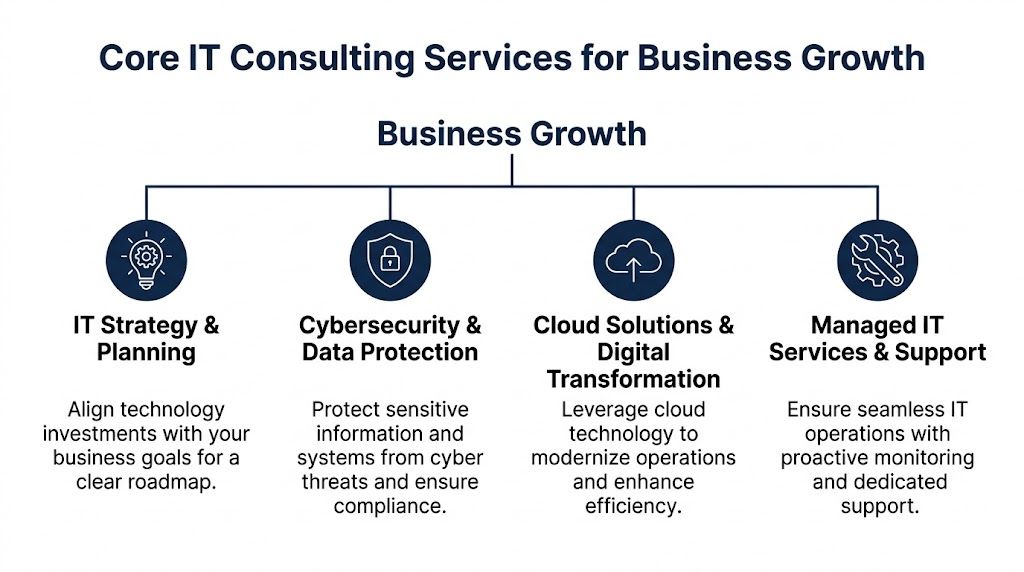
Managed IT services handle the operating layer of the business. Monitoring, patching, endpoint management, user support, backup checks, and routine maintenance all sit here.
The payoff is consistency. Tickets get tracked. Recurring issues get identified. Fixes become standard instead of improvised.
That matters more than many owners expect. One flaky laptop or one Microsoft 365 login issue is an annoyance. The same issue repeated across ten staff, over six months, becomes a drag on payroll, customer response times, and morale. Good managed support removes friction from daily work and gives the business a clearer picture of what keeps breaking and why.
It can also be cheaper than trying to cover every need with one internal hire, especially for Canadian SMBs outside major centres where senior IT talent is hard to recruit and retain. If you want a practical overview of that model, this guide to managed IT services for small business explains what day-to-day coverage should include.
Security consulting starts with exposure and consequence.
A small business does not need every security tool on the market. It needs the right controls configured properly. That usually means multi-factor authentication, endpoint protection, backup testing, email security, access reviews, and clear rules for who can reach what data from which device.
The trade-off is straightforward. Stronger controls can add a bit of user friction. Poor controls create expensive downtime, fraud risk, privacy issues, and cleanup work that drags on for weeks. In regulated Canadian sectors, one weak approval process or one shared account can create both an operational problem and a compliance problem.
I often see businesses buy overlapping products before they fix the basics. Better results usually come from tightening policies, reducing admin privileges, and testing recovery, not from stacking more licences onto a weak setup.
Cloud consulting is about improving how work gets done, not just changing where files live.
Used well, cloud platforms reduce dependency on one office, one server, or one person who knows how everything works. Teams can collaborate more cleanly in Microsoft 365, SharePoint, Teams, Azure, and line-of-business apps. Remote staff get secure access. New hires can be onboarded faster. Backups and recovery can become easier to manage if the design is done properly.
Poor cloud projects create a different kind of mess. Data gets duplicated. Permissions become inconsistent. Staff keep using old workarounds because the new setup was never mapped to the workflow.
A cloud migration works like moving a warehouse, not just renting a new building. If you label shelves, control access, and plan the layout first, operations improve. If you move boxes without a plan, people waste time looking for what they need.
A virtual CIO brings planning discipline to technology decisions. That includes budgeting, vendor review, lifecycle planning, policy direction, risk management, and deciding what should happen this quarter versus what can wait.
This service matters when the business has grown past reactive support but is not ready for a full-time CIO. It gives ownership and leadership a way to test decisions before signing contracts or launching projects.
The questions are practical:
One provider in this space is CloudOrbis Inc., which offers managed support, cybersecurity, cloud services, backup, VoIP, and vCIO consulting through a structured engagement model. For a Canadian SMB, that kind of combined delivery can reduce handoffs, clarify accountability, and keep strategy tied to day-to-day operations.
Generic IT advice breaks down quickly in regulated environments. A healthcare clinic, a law office, and a manufacturing firm may all use Microsoft 365, but they do not carry the same operational risk.
That’s where sector-specific consulting earns its keep.

In Ontario healthcare settings, patching and endpoint discipline aren’t administrative chores. They’re part of privacy protection.
For Ontario-based SMBs, a 2023 Canadian Centre for Cyber Security report found that 68% of incidents stemmed from unpatched vulnerabilities, and expert IT consultants can reduce breach likelihood by 74% through automated vulnerability assessments, according to this summary of small business IT consulting expert tips. In a PHIPA-sensitive environment, that’s a concrete reason to treat vulnerability management as a business process, not a background task.
A clinic typically needs:
If your team is also evaluating patient messaging or secure reminders, this guide to a HIPAA compliant communication platform is a useful companion resource because many of the design considerations overlap with Canadian privacy-focused communication planning.
Law offices and finance teams run on trust. Clients assume documents are secure, communications are controlled, and records are handled properly.
The technology problems in these firms are usually subtle at first. File shares grow messy. Permissions expand over time. Staff forward documents in ways that bypass policy. A consultant with sector knowledge will focus on encryption, secure collaboration, audit readiness, retention practices, and user access controls. A generalist often stops at “the files are available.”
If a consultant can’t explain how they handle document sensitivity, user permissions, and audit exposure in your industry, they’re not ready for regulated work.
On the operations side, manufacturing and logistics firms care less about buzzwords and more about continuity.
A plant office needs the network to stay stable. Warehouse teams need dependable connectivity. Phone systems can’t become a project that interrupts dispatch. Cloud ERP, device management, and business VoIP all need to support the pace of real operations.
The consultant’s job here is to reduce friction between office systems and operational reality. That often means standardising devices, reviewing wireless coverage, securing endpoints on the floor, and planning cloud access that won’t slow down production workflows.
CloudOrbis’ industry page outlines the kinds of sector-specific needs that show up across healthcare, legal, finance, manufacturing, logistics, and construction at CloudOrbis industries.
Owners usually ask the pricing question first. That’s fair. But the better question is what happens to the business when technology is managed with intent instead of habit.
The clearest return comes from access to the right expertise at the right time. Data shows that 39% of Canadian SMBs rely on external IT consultants as their primary support model, with typical hourly rates of $125 to $300, according to this review of IT consulting benefits for small businesses. For many firms, that’s a practical alternative to hiring a senior full-time resource before the workload justifies it.
| Benefit area | What improves |
|---|---|
| Financial control | Spending becomes more deliberate, and avoidable fixes shrink |
| Productivity | Staff lose less time to recurring access, device, and collaboration issues |
| Risk reduction | Security gaps, compliance exposure, and recovery weaknesses get addressed earlier |
| Scalability | The business can add users, locations, and tools without rebuilding every process |
A lot of businesses miss one key point. ROI from consulting isn’t only about lowering direct IT spend. It’s also about preventing bad decisions.
A well-run environment makes everyday work smoother.
New employees get onboarded faster because accounts, permissions, and device standards are already documented. Managers get fewer complaints about access problems. Finance sees fewer surprise invoices tied to urgent failures. Leadership can approve technology budgets with more confidence because the spending has a roadmap behind it.
That kind of return doesn’t always show up in one line item. It shows up in fewer disruptions and better decisions.
The strongest ROI usually comes from problems the business never has to experience.
For another practical view of value beyond ticket resolution, CloudOrbis has a concise article on the benefits of managed IT services.
Pricing models shape behaviour. That’s why choosing the wrong one can create frustration even when the provider is technically competent.
Three models are common.
This works well for defined initiatives such as a Microsoft 365 rollout, a cloud migration, a security assessment, or a VoIP deployment.
The benefit is clarity. Scope, milestones, and deliverables are easier to define upfront.
The weakness is that project pricing doesn’t automatically cover what happens after go-live. If support, optimisation, or user adoption isn’t addressed separately, the project can land well on paper and still disappoint in practice.
This is the oldest model. You call when something breaks, and you pay for the time required.
It can fit very small businesses with simple environments and low operational risk. It can also suit occasional specialist needs.
But it rewards reaction, not prevention. If the provider only gets paid when things go wrong, there’s less built-in incentive to reduce recurring issues.
This model supports an ongoing relationship. The provider handles monitoring, maintenance, support, and often broader planning under a recurring agreement.
The biggest advantage is predictability. Costs are easier to budget, and accountability tends to improve because the provider is responsible for ongoing health, not isolated incidents.
Here’s a simple comparison.
| Model | Best For | Cost Structure | Key Benefit |
|---|---|---|---|
| Project-Based | One-time migrations, upgrades, and implementations | Fixed scope or defined project fee | Clear deliverables |
| Hourly or Break-Fix | Occasional support in simple environments | Pay for time used | Flexible for infrequent needs |
| Managed Services Retainer | Ongoing support, security, and planning | Recurring monthly agreement | Predictable costs and proactive oversight |
The right choice depends on your risk tolerance. If downtime, compliance, and staff productivity matter every week, a purely reactive model usually becomes expensive in the ways that matter most.
A polished proposal doesn’t tell you much. The true test is whether the consultant understands your operating environment, your risk profile, and your decision pace.
That matters even more in regulated sectors. For Canadian small businesses in regulated industries, poorly-scoped consulting can create compliance gaps and penalties under laws such as Ontario’s PHIPA that can exceed the original consulting investment, as discussed in this article on technology consulting firms for small businesses.
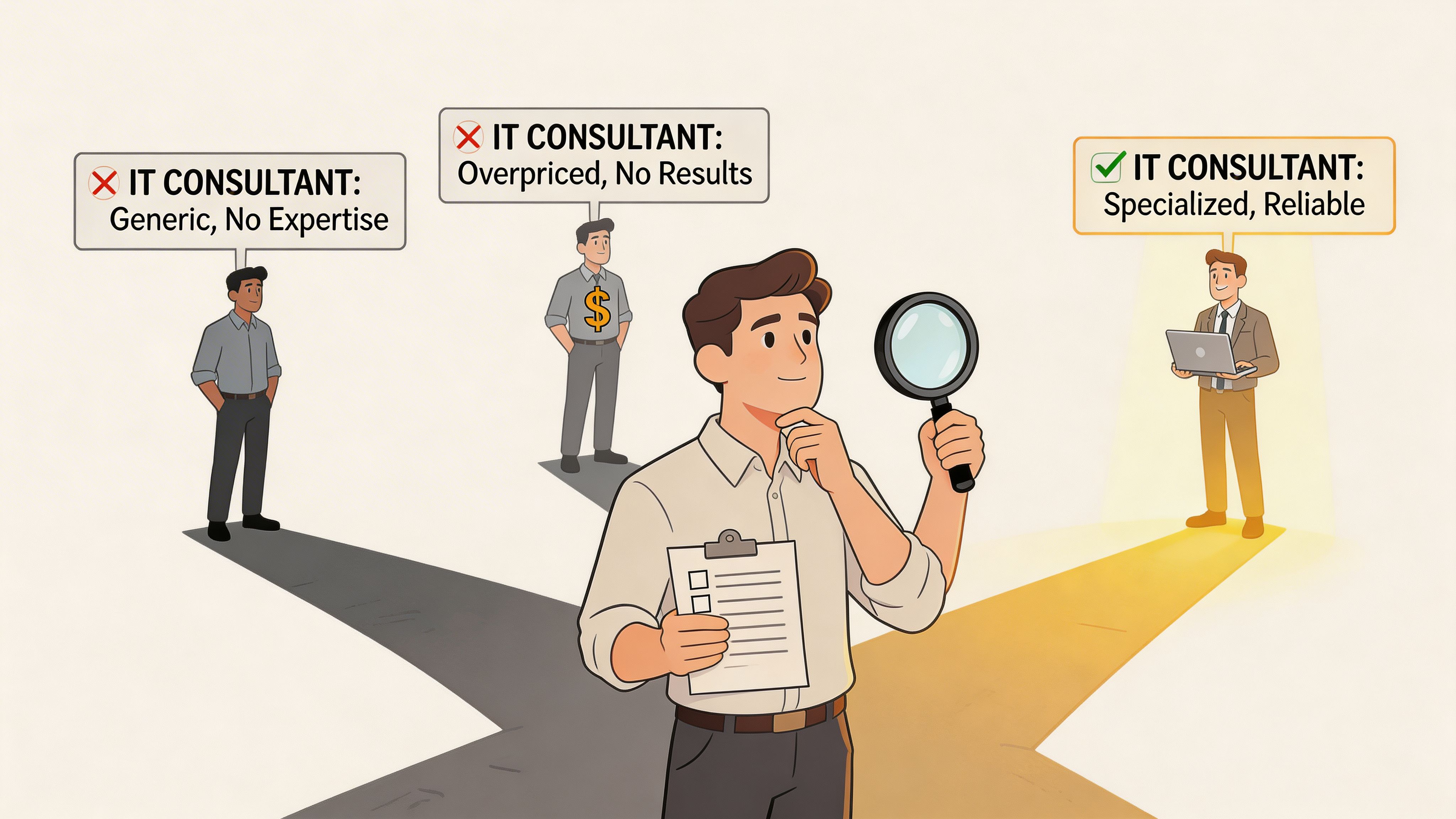
Use this as a working checklist.
These questions usually reveal more than a capabilities slide.
Strong consultants answer directly. Weak ones hide behind jargon.
Be cautious if you hear any of the following:
For businesses comparing outsourced support options more broadly, this article on choosing an IT outsourcing company gives a useful lens.
Choose the consultant who asks better questions, not the one who names the most products.
The handoff after signing is where many consulting relationships become messy. Expectations blur, internal staff get surprised, and small implementation issues turn into resistance.
That’s the transition friction many businesses feel after change. The problem isn’t only the technology. It’s the absence of structure. As noted in this overview of getting started with IT consulting, many small businesses experience productivity dips after implementation, and a structured 10-step engagement process is designed to reduce that disruption and deliver measurable ROI sooner.
A practical onboarding model should look something like this.
Discovery conversation
Clarify business goals, pain points, compliance pressures, and growth plans.
Environment assessment
Review infrastructure, endpoints, cloud tools, security posture, and support gaps.
Risk and gap analysis
Identify what threatens operations, privacy, uptime, or user productivity.
Roadmap development
Turn findings into a phased action plan with priorities.
Budget and scope alignment
Match recommendations to business realities, not ideal-world wish lists.
Implementation planning
Sequence changes so critical operations aren’t disrupted unnecessarily.
Technical rollout
Execute upgrades, policy changes, migrations, or security improvements.
User training and communication
Give staff the context and guidance needed to work confidently in the new environment.
Stabilisation and support
Resolve early issues quickly and monitor adoption patterns.
Continuous optimisation
Review what’s working, what’s drifting, and what the next business priority should be.
A structured model does two things that matter. It reduces operational surprises, and it makes responsibility visible.
When owners know what happens next, who’s involved, and how success will be measured, they’re far more likely to get the value they expected from the engagement.
Small businesses don’t need perfect technology. They need technology that is secure, organised, supportable, and aligned with how the business functions.
That’s the core value of it consulting for small business. It replaces guesswork with priorities. It replaces reactive fixes with planning. It gives leadership a clearer view of risk, cost, and opportunity.
The strongest outcomes usually come from a partner who understands your industry, speaks plainly, and follows a disciplined process from assessment through optimisation. If your systems feel harder to manage than they should, that’s usually a sign the business has outgrown ad hoc IT decisions.
If you’re ready to reduce downtime, tighten security, and put a practical roadmap behind your technology, talk to CloudOrbis Inc.. A structured assessment is the first step toward an IT environment that supports growth instead of slowing it down.
April 14, 2026
Managing a Help Desk: The 2026 SMB PlaybookMaster managing a help desk effectively. Our 2026 playbook for Canadian SMBs covers setup, staffing, security, metrics, & proactive IT support.
Read Full Post
April 13, 2026
Unlock Growth: Streamline Business Process in 2026Learn to streamline business process. This guide gives Canadian SMBs a playbook for using managed IT, cloud, and automation for efficiency and growth in 2026.
Read Full Post
April 12, 2026
Virtual Desktops for Windows: A Guide for Canadian SMBsExplore virtual desktops for windows. Our guide compares AVD, Windows 365, and VDI for Canadian SMBs, covering security, cost, compliance, and implementation.
Read Full Post
